Tuesday, April 6, 2021

One-Minute Spotlight Videos Feature 🐓 🎭 🦠 in Barrington 220

The Department of Technology & Innovation releases a new episode of Learning NOW in Barrington 220 each week at www.youtube.com/learningnow220. Each One-Minute Spotlight episode highlights some of the ways Barrington 220 teachers are teaching—and students are learning—in one-minute stories about a lesson or activity.

Here are our newest episodes:

Hough Elementary - Ms. Magdalener - Grade 4

Grade 4 students at Hough School in Ms. Magdalener’s class learn about perimeter and area through “Chicken Math.” Using the app Class Kick and the web app Braining Camp, students access tools that lead them through the steps necessary to measure the size of the teacher’s chicken coop, re-create a drawing of the coop with an on-screen geoboard, and then calculate various measurements of perimeter and area. 🐓

Barrington High School - Ms. Nowak - Drama

Barrington 220 High School Drama teacher Paula Nowak uses Flipgrid and iMovie to facilitate peer-to-peer feedback for her Drama students. 🎭

A Year of Innovation During the Pandemic - Dr. Fuller & Mr. Gorman

Much has changed in the past year as the Barrington 220 community has leaned on technology—and each other—to continue offering the highest level of education possible. Teachers and students found new ways to effectively teach and learn. Whether synchronous or asynchronous, remote or in-person, blended learning strategies allowed student-centered learning to continue. As more students return for in-person learning, we’ll continue to innovate in Barrington 220. 🦠


SOPPA for Teachers: A Three-Part PD Event!

In last month's edition of the #bsd220tech newsletter, we introduced you to the new state of Illinois mandate called SOPPA, the Student Online Privacy Protection Act. While we gave you an investigative overview of what this new law means for our school district beginning July 1, 2021, there is now an opportunity to go deeper and learn more about how this will impact you as an educator through a new webinar series offered by our partnership with the Illinois Digital Educators Alliance (IDEA). 

This three-part series focuses on teachers and will help you understand the legislative aspects of SOPPA, as well as how SOPPA will impact your classroom in the future. Illinois educators can earn a half-hour of Professional Development credit for each of the 3 sessions. A link to the PDH forms will be shared in the chat at the end of the webinars. 

To register for this webinar series, click here: https://ideaillinois.org/event-4240669

This Webinar Wednesday is offered after school from 4:00 to 4:30 P.M. and begins on April 21, 2021. The session is free thanks to Barrington 220’s membership in the Illinois Digital Educators Alliance and is sponsored in partnership with the Illinois Educational Technology Leaders organization (IETL).


Access Infinite Campus Training Videos Before April 30

Last fall, Barrington 220 purchased district access to Infinite Campus's National Training Week Virtual Training. All of the courses offered during that week were recorded and because of our purchase, we have had access all school year.

That window of opportunity to view these courses and receive valuable, just-in-time learning will be closing soon. So we wanted to remind you to take advantage of this wonderful opportunity to help get you up to speed on just about any topic IC has to offer.

This training was wide-focused on all users of Infinite Campus, from Teachers to Administrators and everyone in between.  The window to access these videos will be closing on April 30, 2021, so please make some time now to access this amazing training opportunity if you haven't done so already! 

P Drives (Home Directories) to be Discontinued in Barrington 220

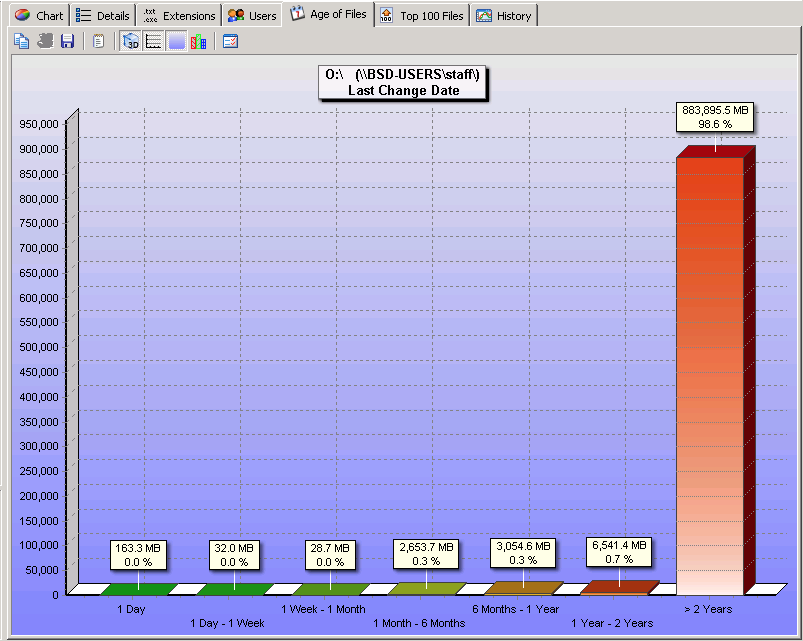
At the end of this school year (May 28, 2021), Barrington 220 will discontinue the use of server based staff "home directories," also known as "P Drives." With the adoption of Google Drive here in Barrington 220, most of the old staff home directories have become a repository for unused documents and files. Our investigation revealed that 98.6% of the files had not been touched in over two years.


In addressing cybersecurity concerns, auditors and insurance companies have requested that we review how we store data, how our users access that data, how our data is backed up, and how our data is secured. Our evaluation of this older storage system has led to our decision to decommission it. If you still use these home directories, please remove any pertinent data and store it elsewhere—one recommendation is to use Google Drive.

As always, if you have questions or concerns in regards to the use of technology here at Barrington 220, please contact your building LTA or our tech support team at x1500 (224-655-1500).

New Ideas, Badges, and More from Apple Education

On March 23, 2021, Apple released a major refresh to the popular Apple Teacher program. The updates include Apple Teacher Portfolio—a brand new Apple Teacher feature—updates to the Everyone Can Create books, and some upcoming app updates including the Apple Classroom app. 

The Apple Teacher updates likely have something that any Barrington 220 educator can use.

Apple Teacher Portfolio

The new Apple Teacher Portfolio helps guide teachers through using Apple apps in meaningful ways in their own teaching, regardless of grade level or subject area. The projects include 21 templates and lesson ideas in apps such as Keynote, GarageBand, and iMovie. The framework allows teachers to begin with existing lessons and enhance them using a three-step process. Apple's process includes:

  • Activate—Introduce ideas, activate prior knowledge, and get students excited about learning with simple warm-ups that help them think about content in creative new ways.
  • Explore—Help students explore new information, connect ideas, and deepen their understanding of new material.
  • Apply—Assess learning with projects that help students demonstrate mastery of new material and apply what they've learned in different contexts.

The process also offers several opportunities to reflect on each phase, and eventually leads you to earn a new Apple Teacher Portfolio recognition to add to your previous badges. 

Of course, if you have not yet started the Apple Teacher program, it’s never too late to begin—just visit appleteacher.apple.com and log in with your Apple ID.

Everyone Can Create

The Everyone Can Create books have also been updated with new content. As Apple apps add new features, new instructional possibilities emerge. Open your Books app on iPad and tap the cloud icon to download the new versions of the books. Some new content includes:

  • Drawing—adds motion graphics and animation in Keynote.
  • Photos—adds creating animated GIFs using Keynote, Camera, and Photos apps.
  • Video—adds green screen and other special effects in iMovie.
  • Music—adds podcasting features in GarageBand.

Classroom App Update (Coming Soon)

Apple also reports that they will soon update the Classroom app to allow its features to extend outside of the classroom to our remote learners. According to Apple:

“For the first time, the Classroom app will support learning beyond the walls of a school. Classroom has always connected students in the same physical space with their teachers, and soon teachers will be able to invite remote students to join a Classroom session.”

The Classroom update is coming soon, but the Apple Teacher Portfolio is available now in the Apple Teacher Learning Center (log in at appleteacher.apple.com), and the Everyone Can Create updates are waiting for you as free downloads in the Apple Books app. 

To read more about these updates from Apple, please check out the Apple Newsroom article.

Popular Recent Posts